
Changelog

Bosnian available as new system language


You can now produce learning modules in the Bosnian language. The language code in the language settings is “bs”.

Inviting reviewers


Users that are allowed to edit content are now by default also able to invite others to review their content.

To do so you only have to give the mail address. If no user with that mail address exists, an user will be created and a mail is sent to the mail address allowing the user to set up a password.
All required permissions are then given to the existing user and they are informed by mail about the review opportunity.

If you do not want this option in your system, you could either disable the option “Allow invitation of new reviewers” in your feature management or contact support@bildungsinnovator.com.

How to invite reviewers

Users with edit permissions can either select “Share” in the sidebar on the right hand side and then select “Invite reviewer” or they can select “Invite reviewer” in the permissions dialog.
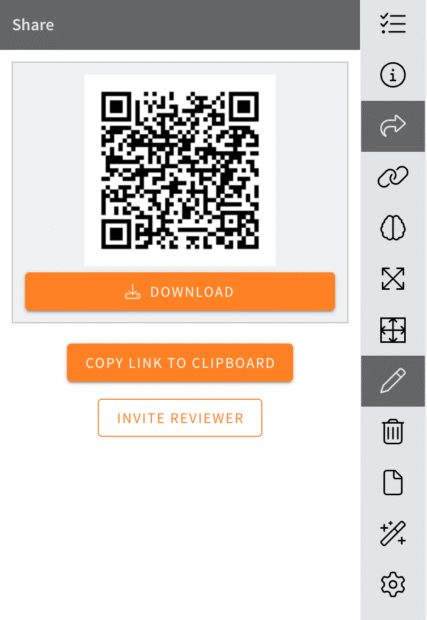
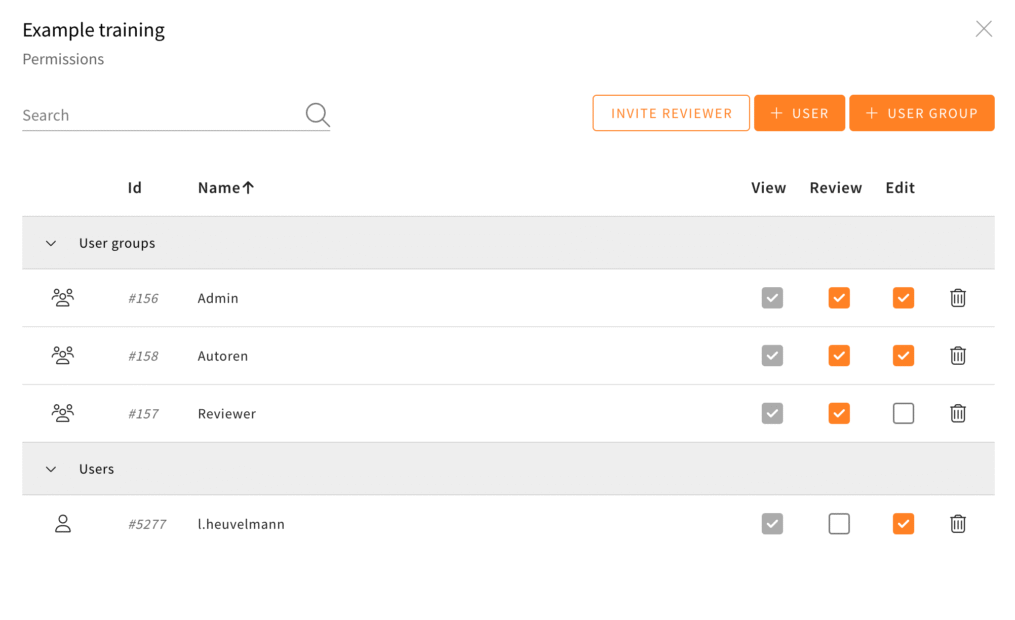
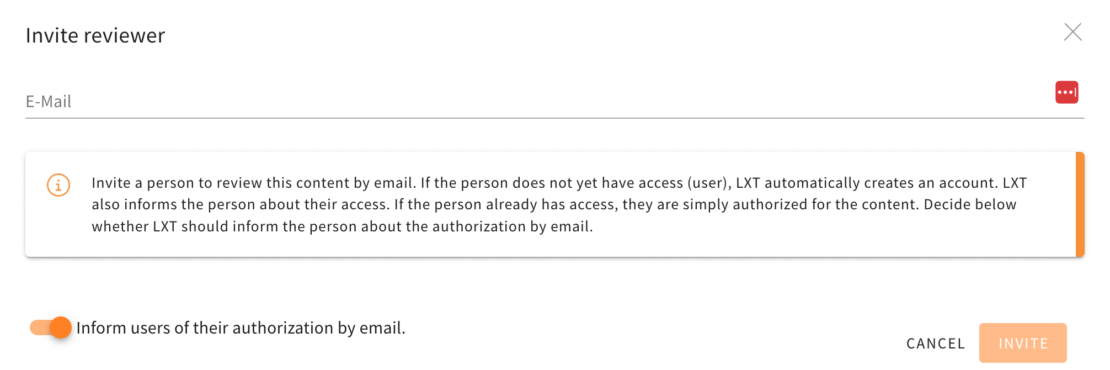
In both cases a new dialog opens that asks for a mail address.
The toggle “Inform users of their authorization by email.” allows to disable the mail informing the user about their new permission.
Newly created users always receive a mail containing their username and a link to set up a password.
Explicit distinction between American and British English available


There is now an explicit distinction between American and British English in LXT. Until now, the differences were hardly noticeable. However, in view of the demands of many native speakers, we want to meet this request.

During the rollout, we tried to find the correct variant for each language existing in LXT. If we have selected the wrong version for your use case, please let us know: support@bildungsinnovator.com.

DeepL – Support for glossaries


You have been able to translate your learning modules in LXT with DeepL for some time now. When translating, it can happen that certain words require a specific translation. For this purpose, DeepL uses so-called glossaries. These glossaries can now also be taken into account in the translation process in LXT.

Relation quiz: images available


You can now use images in a matching quiz. The images all have a fixed aspect ratio. Please note that this feature is only available for the following three stylesheets:

  • Answers positioned right (one below the other)
  • Answers positioned below (side by side)
  • Answers positioned below (one below the other)

Notice on AI-generated content


You can now label the elements text, image and the quiz elements (choice text, value slider, order, relation, value input, date input) so that they have been generated with AI. If you are working with AI in LXT, this label isn’t preset. However, you can activate it via the appearance of the element.

User management – Invite new users by e-mail


Create users and allow LXT to inform them of their access by e-mail. No password is required when creating a user, but a valid email address must be entered. Users can then use the link to set a password and log in.

Current browser versions for optimal LXT use


Dear LXT users,

as you already know, up-to-date browser versions are essential for LXT to function smoothly and securely. That is why we are updating our system requirements again this year – so that you can continue to work securely and with the best possible performance.

Further colours in the colour controls


We expand the colour palette for two UI elements in LXT to a maximum of seven (previously a maximum of three was possible: primary colour, light, dark).

  • Slideshow: Colour of the controls/arrows
  • Slideshow / Flipcard: Colour of the icons (may be chosen individually for each card)

If you would also like to have other colours for these elements, please send us the exact values to support@bildungsinnnovator.com.

More design options for tables


You now have a range of new formatting options available for the table via the appearance on the element. These include:

  • Background color
  • Table cell spacing
  • Border color (horizontal, vertical, outer)
  • Drop shadow
  • Rounded Corners